
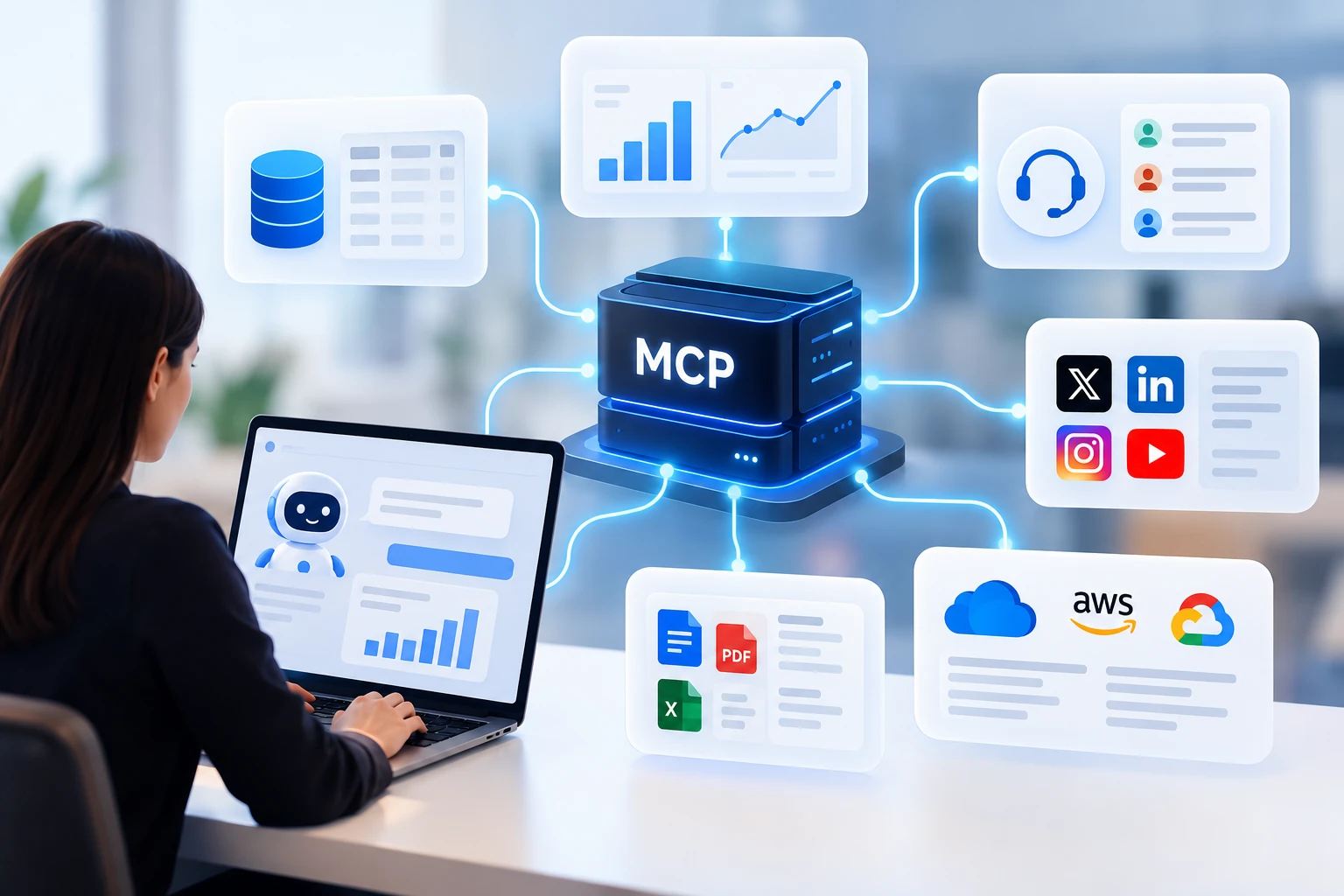
Have you heard of MCP, or Model Context Protocol, one of the most talked about terms in generative AI? If you do not closely follow this space and have no idea what it means, here is a quick explanation.
MCP was launched in November 2024 by Anthropic, the company behind Claude, to help address challenges related to standardization, portability, complexity, and scalability when connecting generative AI models to external data.
It is an open protocol that standardizes how these models connect to external tools such as databases, APIs, and business systems, creating a bridge that allows AI to access and analyze real world data through natural language.
Since December 2025, MCP has been maintained by the Agentic AI Foundation, which is associated with the Linux Foundation, meaning the protocol is no longer controlled by a single company.
When MCP was first released and quickly became a major topic in AI, I wondered: Is this just another kind of API repackaged with a powerful marketing campaign?
In this article, I answer that question, explain how MCP works, and explore what it actually changes in practice.
What Is MCP and How Is It Structured?
In technical terms, the way MCP is organized is called its architecture. MCP follows a client server model, the same basic model we use every day on the internet. When you type a website address into a browser such as Chrome, Safari, Firefox, or Edge, your computer or phone acts as the client. It requests a page stored on another computer, the server.
For the two sides to communicate, they need an interface made up of protocols, which define the rules of the conversation, and an API, or Application Programming Interface, which provides the channel through which requests are sent. To make this easier to understand, imagine a restaurant.
You are literally the customer. The kitchen is the server, where everything is prepared. The menu shows what is available, and the waiter acts as the bridge between you and the kitchen. You choose a dish and place your order with the waiter. The waiter takes the request to the kitchen and later brings the finished dish to your table.
Anthropic used a similar concept when designing MCP, which is built around three main components: the host, the client, and the server.
The host is the AI application you use, such as Claude Desktop or ChatGPT. The MCP client runs inside the host and is responsible for making calls to the server. Each client connects to one server, but a host can have several clients running at the same time, allowing it to access multiple servers.
One important distinction: in MCP, you are not the client.
The client is the part of the AI application that carries requests to the server, much like the waiter in the restaurant example. The MCP server, meanwhile, provides access to an external system such as a database, an API, or even a social listening platform. It can offer three main types of functionality to the AI: resources, tools, and prompt templates.
Resources
Resources are the information that an MCP server makes available for the AI to read. Think of resources as a shelf of reference materials. The AI can read what is there, but it cannot change it. What appears on that shelf depends on the type of server. For an MCP server connected to a database, the resources might include database tables containing company data.
For a server connected to a social listening platform, the resources might include social media mentions of a brand, along with what people said and the sentiment associated with each comment.
Tools
Tools are the actions that an MCP server allows the AI to perform. If resources are the reference shelf, tools are the buttons the AI can press to make something happen. It might search for information, send a message, or update a record. This is one of the capabilities that makes MCP particularly powerful because AI can move beyond simply answering questions and begin taking actions.
On a server connected to a database, tools might allow the AI to create a table, run a query, or insert new records. On a social listening server, one tool might allow the AI to retrieve brand mentions published during the past seven days.
Prompt Templates
Prompt templates are predefined instructions provided by an MCP server for tasks that are performed frequently.
If resources are the shelf and tools are the buttons, prompt templates are like recipes. Instead of having to explain every step of a task to the AI each time, the user can select a predefined recipe and provide only the missing information. These templates are created by the developers of the MCP server, who understand the most common tasks and know how to structure the instructions effectively.
For example, a social listening server might include a template for “summarizing brand sentiment over the past week,” where the user only needs to provide the brand name.
What is the difference between MCP and a traditional API?
One of the easiest ways to understand the difference between a traditional API and MCP is to look at who creates them and who is expected to use them.
A traditional API is generally created by one programmer for another programmer. Someone building a REST API, for example, defines specific routes for accessing data and writes technical documentation explaining how those routes work. Another programmer reads the documentation, understands the rules, and writes specific code to connect to that API.
If something in the API changes, that code may stop working until someone updates it. MCP is different because it is designed by a programmer to be used by AI. Instead of simply exposing technical endpoints, an MCP server presents its tools, resources, and prompt templates together with descriptions written in natural language, much like the way we would explain them to another person.
The entity reading those descriptions is not a piece of prewritten code. It is the AI model itself, which uses its reasoning capabilities to determine what to use and when. In practice, MCP does not replace APIs. It works as a layer on top of them.
Many MCP servers are actually built using APIs that already exist. The difference is that while each API typically requires custom integration code, MCP provides a common standard that compatible AI applications can understand.
Table 1. Key differences between MCP and a traditional API
| Feature | Traditional API | MCP |
|---|---|---|
| Who it is designed for | Programmers and systems developed to follow predefined rules | AI models, LLMs, and autonomous agents |
| How available capabilities are discovered | Static. A programmer reads technical documentation and manually programs each type of access | Dynamic. When the connection is established, the AI receives a list of what the server provides along with descriptions of each item |
| Format | Each API has its own routes, syntax, and rules | A common standard across MCP servers, organized into tools, resources, and prompt templates |
| Continuity | Each request is typically independent of previous requests, or stateless | Maintains an ongoing connection between client and server, making it suitable for multistep tasks |
So, returning to the question from the beginning of the article: Is MCP simply another kind of API repackaged with a powerful marketing campaign?
The answer is no.
Although both technologies are used to connect systems, they operate in fundamentally different ways.
Debunking the myth of “Magic Creation”
A common misconception is that MCP automatically discovers data or creates tools on its own, that is not how it works. Every resource and tool must first be programmed by someone with technical expertise who develops the MCP server. MCP does not program itself. The “magic” is not in creating capabilities. It is in discovering and connecting to them.
With a traditional API, if you want an AI application to use a new function, you may also need to change the application code that makes the API call. With MCP, a developer can add the new function to the server.
When the AI application connects, it effectively asks:
“What can you do?”
The server responds with a list of available tools, and the AI determines how and when to use each one based on the context of the conversation. However, there is an important limitation: the AI can only use the capabilities included in that list. Another analogy can make the distinction clearer.
Think of a traditional API as an ATM. The buttons displayed on the screen are fixed. If the bank wants to introduce a new feature, it has to update the interface. MCP is more like a QR code linking to a restaurant menu.
The restaurant owner, or server, still has to create the menu. But when someone arrives at the table, the AI in this analogy, they only need to scan the QR code to immediately see everything currently available, even if today’s special changed five minutes ago.
Advantages of MCP compared with traditional APIs
In addition to dynamic discovery, MCP offers two practical advantages over traditional API integrations:
- Less integration code and greater standardization
- Portability
Connecting an AI application directly to a traditional API can require a significant amount of intermediate code.
That code may need to interpret what the AI requested, validate the format, handle API errors, and transform the API response into something the AI can understand. And much of this work needs to be recreated for every application. With MCP, this work is handled once at the server level and presented to the AI through a standardized format.
The result is less integration code and greater standardization.
An MCP server created today for a company’s internal system can potentially be used with Claude Desktop, Cursor, a Visual Studio Code extension, or agent frameworks such as LangChain and CrewAI. The integration is created once and can be used by any compatible AI application that supports the MCP protocol. That creates a significant portability advantage.
How MCP works in practice and democratizes access to data
Imagine that a company uses a social listening platform with an API that provides access to brand mentions across social media.
Today, if someone wants to combine that information with other data or perform analyses beyond the dashboards already available in the platform, a person with technical expertise will often need to write code or build a custom report. With MCP, a developer can build an MCP server on top of that API.
From that point on, people across the organization, from marketing to customer service, can connect the server to Claude Desktop and ask questions using natural language.
The MCP server works like a translator. It sits between the platform’s API and Claude Desktop, turning technical queries into simple conversations. In practice, the process can be summarized in three steps:
1. Creating the server
A developer writes code using a programming language such as Python and connects it to the platform’s API. Within that code, the developer defines the tools, giving each one a name and a clear description of what it does.
2. Connecting the server
The MCP server is added to Claude Desktop. This can be done through an extension installed with a few clicks or through a configuration file, which is usually prepared by the technical team.
3. Using the server
Once connected, Claude can access the data made available by the platform. The user does not need to understand what a GET method, authentication token, or pagination is.
They can simply ask: “What were the most discussed topics about our brand last month, and what was the predominant sentiment?”
Figure 2 shows how this process works step by step.
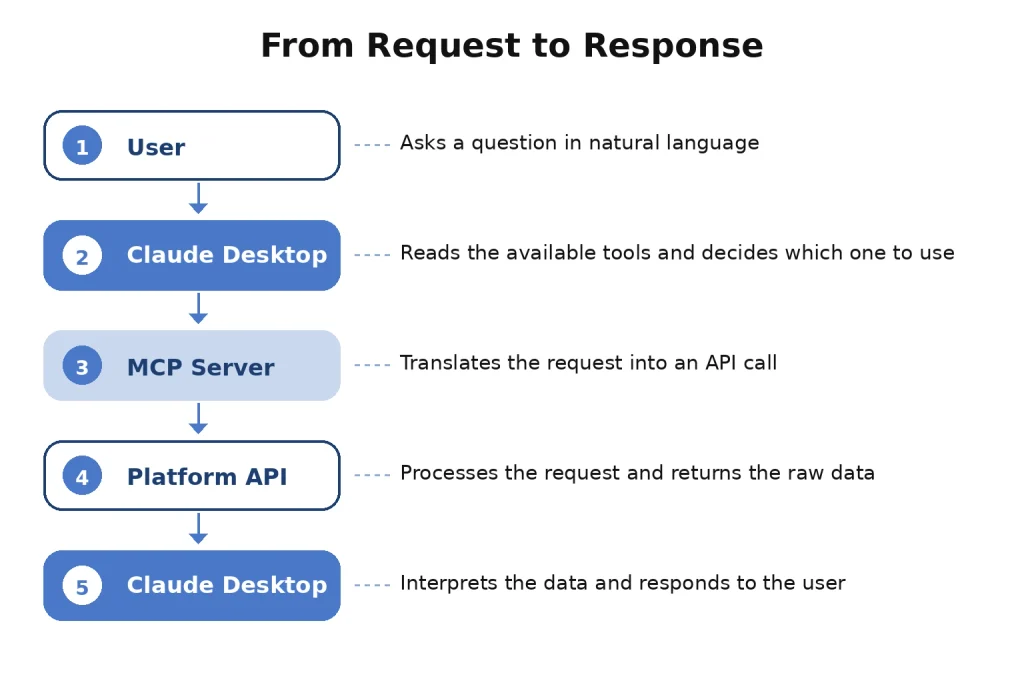
When the user asks the question, the following happens:
Claude analyzes the request. Among the tools the MCP server provided when the connection was established, Claude identifies one called search_brand_mentions, with a description such as: “Use this tool to retrieve brand mentions on social media for a specified period, including the topic and sentiment of each mention.”
Claude uses the tool. It identifies and fills in the required information itself, for example:
start_date: "2026-08-01"end_date: "2026-08-31"
Then it sends the request to the server.
The server communicates with the API. The MCP server calls the platform’s API and receives a technical response containing data, codes, and identifiers. It then returns that information to Claude.
The user receives the answer. Claude interprets the data and presents it clearly.
A hypothetical response could look like this:
“Last month, the brand received approximately 12,000 mentions. The most discussed topic was customer service through the app, with predominantly negative comments, followed by the new advertising campaign, which received mostly positive feedback.”
Benefits of this approach for nontechnical users
Instead of contacting the Analytics team every time they need a piece of information, managers, marketers, and analysts can query the social listening platform directly using natural language and without needing technical expertise.
This creates greater autonomy. At the same time, users do not gain unrestricted access to the database or every capability available through the API. They can only perform the actions that the MCP server allows.
If the server does not include a tool for deleting a monitoring project, Claude cannot perform that action through the MCP server, even if the user asks it to. This provides greater control.
Once the data reaches Claude, the user can also ask the AI to analyze it, create charts, build tables, or prepare an executive summary, all within a few minutes and without switching tools. In other words, the analysis can continue within the same conversation. However, democratizing access to data does not eliminate the need for safeguards.
AI responses can contain interpretation errors, so numbers used to support business decisions should be verified. In addition, when a company uses an external AI application, corporate data may be sent to an outside service. That use must comply with the organization’s security and privacy policies.
Conclusion
A traditional API is like a railway line: efficient and fast, but it can only travel where the tracks have already been built. MCP is more like giving the AI a map and a self driving car. The roads, or tools, are still built by people and must already be mapped. But the AI can decide which route to take based on what each request requires. That does not mean traditional APIs are becoming irrelevant or will disappear. Quite the opposite. They remain an essential technical foundation, and many MCP servers are built on top of them.
What changes is that APIs now have an additional layer working with them. MCP acts as a translator that hides much of the technical complexity and allows more people to interact with company data using natural language. Ultimately, MCP does not make AI smarter. It makes AI more useful by giving it organized and controlled access to information that previously could only be reached by specialists.